Undelete Plus 2.7.1.0
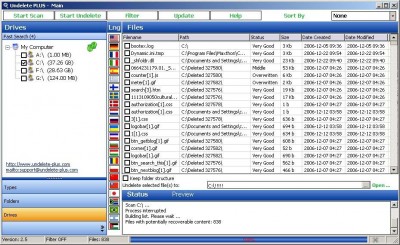
 Undelete Plus is a quick and effective way to retrieve accidentally deleted files, files removed from the Recycle Bin, in a DOS window, from a network drive, from Windows Explorer with the SHIFT key held down.
|

 0.00
0.00  Freeware
 0K
0K
 Windows Vista
Undelete Plus is a quick and effective way to retrieve accidentally deleted files, files removed from the Recycle Bin, in a DOS window, from a network drive, from Windows Explorer with the SHIFT key held down.
Undelete Plus works under Win 95/98/Me/NT/2/XP/2003 operating systems. The program supports all Windows file systems for hard and floppy drives including FAT12/16/32, NTFS/NTFS5 and image recovery from CompactFlash, SmartMedia, MultiMedia and Secure Digital cards.
Undelete Plus is a completely FREE Software. It contains absolutely NO ADWARE, NO SPYWARE, NO REGISTRATION, NO POPUPS, NO MALWARE or other unwanted software.
Undelete Plus allows the following actions to be performed:
- Recovery of deleted files from NTFS/NTFS5, FAT12/FAT16/FAT32 volumes.
- Restoring deleted files on Windows 2, Windows XP, Windows 98, Windows ME, Windows NT.
Important Information: As soon as you discover that vital files have been erased, the most important thing is to prevent erased files from being rewritten. To do so, avoid any use of the disk where the file was erased until after the files are recovered. Also remember that Undelete Plus shouldn't be installed to this disk - install it to floppy if no other disk is available.
The following three things are important for restoration considerations:
(1) The less time since the disk has been defragmented, (2) the sooner you make a restoration attempt, (3) the smaller the size of the file - the more chances for success we have.
When Undelete Plus saves a restored file it reads its content and writes it to a new file with the same name. It is recommended that you save files on another disk because of the risk of overwriting other erased files with the new saved one. If you still choose to save files on the same disk from where they were restored, all files will be read from disk to memory and only after that will be written to disk. Then to check the condition of other erased files on disk, it will be re-scanned.
tags undelete plus erased files with the deleted files the same other erased the file save files files from ntfs ntfs5 the following the disk
Download Undelete Plus 2.7.1.0
 Download Undelete Plus 2.7.1.0
Authors software
 Turbo File Uneraser 1.1
FDRLab Data Recovery Centre
Turbo File Uneraser is a data recovery application that helps you to recover:
· Files and Folders emptied from the Recycle Bin.
Undelete Plus 2.7.1.0
FDRLab Data Recovery Centre
Undelete Plus is a quick and effective way to retrieve accidentally deleted files, files removed from the Recycle Bin, in a DOS window, from a network drive, from Windows Explorer with the SHIFT key held down.
 Ms Word Excel Cracker 2.0
FDRLab Data Recovery Centre
Excel Cracker is a useful application designed to recover lost or forgotten passwords for .
Similar software
Undelete Plus 2.7.1.0
FDRLab Data Recovery Centre
Undelete Plus is a quick and effective way to retrieve accidentally deleted files, files removed from the Recycle Bin, in a DOS window, from a network drive, from Windows Explorer with the SHIFT key held down.
 Roadkil's Undelete 1.2
Roadkil
 Restauration 2.5.14
usb-mania.com
Restauration portable is a powerful toll to undelete files that were removed from any storage device, usb-Stick, iPod, Flash card or hard disks (recycle bin or directly deleted from within Windows).
 NTFS Undelete 0.9
A-FF Labs
NTFS Undelete is a freeware application which will allow you to recover deleted files.
 DeleteOnClick 1.0
2BrightSparks
When you delete a file or folder using Windows, it is usual for the file or folder to be moved to the Recycle Bin (Trash).
 Fundelete for Windows NT 2.02
Mark Russinovich
Although NT 4.
 Pandora Recovery 0.9.33 Beta
Pandora Corp
Pandora Recovery is a powerful free tool to attempt recovery of permanently deleted files.
 eDATA Unerase Personal Edition 3.0.22
OctaneSoft.com
eDATA Unerase is a powerful and easy-to-use data recovery software to
recover lost or deleted files from hard drives, floppy disks, digital
cameras, SmartMedia, CompactFlash, Sony Memory Sticks, IBM Micro Drives,
Flash cards or other removable media types.
 OrionSoft Undelete 1.0
OrionSoft
OrionSoft Undelete will recover deleted files from your hard disks and floppy disks formated in FAT12/16/32 format - i.
 SoftPerfect File Recovery 1.2
SoftPerfect Research
SoftPerfect File Recovery is a useful application that helps you restore accidentally deleted files from hard and floppy disks, USB flash drives, CF and SD cards and other storage media.
Other software in this category
 Prevent Deletion 1.0
Mohammad Saiedi
Using this program you can prevent the deletion of certain files/folders on a shared drive in your network.
 SectorSpyXP 2.1
Lexun Freeware
SectorSpy examines hard drive or diskette information at the sector level.
 BackupGenie 1.7
Universal Technologies
BackupGenie will be easily configured to do many backup tasks of directories and files.
 DrvImagerXP 2.2
Lexun Freeware
DrvImagerXP restores and creates images of FAT32 and NTFS drive partitions for the Windows2/XP operating systems.
 DrvClonerXP 2.1
Lexun Freeware
DrvClonerXP copies a whole drive partition byte-for-byte, sector-by-sector, directly to another drive partition, producing an exact reproduction (clone) of the original partition.

 RSS
RSS