Process Explorer 10.21
 Process Explorer will show you information about which handles and DLLs processes have opened or loaded.
|

 0.00
0.00  Freeware
 0K
0K
 Windows Vista
Process Explorer will show you information about which handles and DLLs processes have opened or loaded.
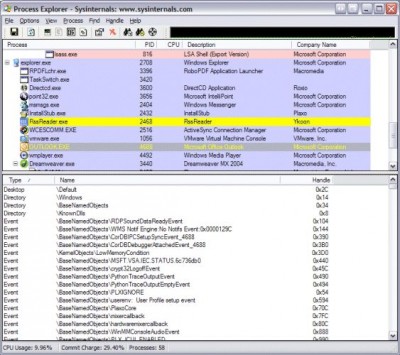
The Process Explorer display consists of two sub-windows.
The top window always shows a list of the currently active processes, including the names of their owning accounts, whereas the information displayed in the bottom window depends on the mode that Process Explorer is in: if it is in handle mode you’ll see the handles that the process selected in the top window has opened; if Process Explorer is in DLL mode you’ll see the DLLs and memory-mapped files that the process has loaded.
Process Explorer also has a powerful search capability that will quickly show you which processes have particular handles opened or DLLs loaded.
The unique capabilities of Process Explorer make it useful for tracking down DLL-version problems or handle leaks, and provide insight into the way Windows and applications work.
Process Explorer features
tags process explorer the process registry key process properties service process process tree configurable refresh that the refresh highlighting youv€™ll see processes have show you loaded the
Download Process Explorer 10.21
 Download Process Explorer 10.21
Authors software
 TCPView 2.4
Sysinternals
TCPView is a little application that displays full details of all TCP and UDP endpoints on your system, including the remote address and state of TCP connections.
 Regmon 7.04
Sysinternals
Regmon is a Registry monitoring tool that will show you which applications are accessing your Registry, which keys they are accessing, and the Registry data that they are reading and writing - all in real-time.
 Filemon 7.03
Sysinternals
Filemon will monitor and display file system activity on a system in real-time.
Process Explorer 10.21
Sysinternals
Process Explorer will show you information about which handles and DLLs processes have opened or loaded.
 BGInfo 4.07
Sysinternals
BGInfo automatically generates desktop backgrounds that include important information about the system including IP addresses, computer name, network adapters, and more.
Similar software
Process Explorer 10.21
Sysinternals
Process Explorer will show you information about which handles and DLLs processes have opened or loaded.
 ProcX 1.0
Ghost Secutity
ProcX displays all running processes and modules on your systems.
 Advanced Process Manipulation 1.1
Diamond Computer Systems
DiamondCS Advanced Process Manipulation (APM) is an advanced process/module viewer and manipulation utility that allows unique control over target processes by literally becoming a part of them.
 Handle 3.1
Mark Russinovich
Ever wondered which program has a particular file or directory open? Now you can find out.
 ActMon Process Monitoring 1.00
Activity Computer File PC Network Monitoring
ActMon Process Monitoring will show you full info about all running applications and processes.
 Itty Bitty Process Manager 1.04
Merijn
A standalone version of the little process manager included in HijackThis (IBProcMan).
 PrcView 5.2.15.1
Computer Technology, Inc.
PrcView is a process viewer utility that displays detailed information about processes running under Windows.
 ListDLLs 2.25
Mark Russinovich
A question that I often get asked is "Do you know of a utility that will show me which DLLs are loaded on Windows 9x or NT?".
 myProcMan 1.1
Turkish Security Network
myProcMan is an interactive, user friendly process manager for Windows.
 SupportView 1.0.1.0
InScope Software
The primary goal of SupportView is to provide a simple, effective way of querying, viewing, and saving critical information about executing processes and machine data.
Other software in this category
 FileDrag 3
Aigars Krjanins
FileDrag is a program that identifies file extension and shows info about it.
 SkinMem 0.50
SkinTech
SkinMem is a freeform skinnable system resource monitor.
 WinComm 2.03
Anthony Galica
WinComm helps you deal with testing through the COM port.
 My CPU 1.13g
Goldfish Software
My CPU is a small utility to find out info on your CPU.
 DLL Informant
Johannes Plachy
DLL Informant shows what DLLs are on the system.

 RSS
RSS