Quick StartUp 5.3.1.96
 Quick StartUp organizes applications that auto-run using Registry, Startup folders in the Start menu and Win.
|

 0.00
0.00  Freeware
 0K
0K
 Windows Vista
Quick StartUp organizes applications that auto-run using Registry, Startup folders in the Start menu and Win.ini file.
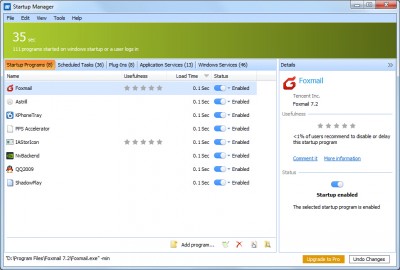
Do you have a ton of programs that start automatically each time Windows starts? Surely you are not using all of them right away, so there is no sense waiting for all of them to load and to start at the hourglass. Quick Startup allows you inspect, edit, temporary disable or delete such programs.
When you select a startup entry in the list, Quick StartUp displays detailed information on the program in the Details box at the bottom of the window.
You can easily determine whether or not you wish to have the program started on the basis of the Product name and Company. If you have never heard of the company or the product, then the entry is probably not needed.
Click the check box in front of an entry to clear it, and the program will no longer be started the next time you start Windows. In this way, you can find out for certain whether the entry is needed.
If something doesn't work properly the next time you start Windows, all you have to do is select the check box again.
If you are certain that you no longer need an entry, you can remove it from the list entirely by clicking 'Delete this entry'.
Quick StartUp features
Requirements
tags startup entries quick startup the program you can you have the next next time time you start windows you start check box the product temporary disable
Download Quick StartUp 5.3.1.96
 Download Quick StartUp 5.3.1.96
Authors software
Quick StartUp 5.3.1.96
GlarySoft Inc
Quick StartUp organizes applications that auto-run using Registry, Startup folders in the Start menu and Win.
 Glarysoft Process Manager 1.2
Glarysoft Inc
Glarysoft Process Manager is an enhanced task manager, that provides advanced information about programs and processes running on the computer.
Similar software
Quick StartUp 5.3.1.96
GlarySoft Inc
Quick StartUp organizes applications that auto-run using Registry, Startup folders in the Start menu and Win.
 Ashampoo StartUp Tuner 1.31
ashampoo GmbH & Co. KG
Ashampoo displays programs which start automatically with Windows and permits you to edit the entries that launch them.
 StartupMonitor 1.02
Mike Lin
StartupMonitor is a tiny application which will run transparently (it doesn't even use a tray icon) and notifies you when any program registers itself to run at system startup.
 Emsa WinStartup Manager 1.0.45
EMSA SYSTEMS LTD
Emsa WinStartUp Manager is a tool that will help you control the list of programs that startup with your Windows.
 Startup Guard 1.0
Acelogix Software
Startup Guard - Monitor your system's auto-startup programs with this lean program.
 RegStart 1.0.5
Classic Software
RegStart is a powerful "Registry Start-Up Cleaner" which will help you remove or backup any element present in your "Registry" and/or "Start Menu" start-up locations.
 StartupRun 1.22
Nir Sofer
The StartupRun tool displays the list of all applications that are loaded automatically when Windows boots.
 MJ Registry Watcher 1.2.5.3
Mark Jacobs
MJ Registry Watcher is a simple system tray application that monitors for changes to any of the startup folders, startup registry keys, and any files you want alerting on.
 Startup Dialogue 1.0
Public Warehouse
Startup Dialogue is a free tool that allows you to set up to 5 applications you want to run at startup.
 Startup Inspector 2.2
Windowsstartup.com
Windows Startup Inspector is a Windows platform tool that helps Windows user to manage Windows startup applications.
Other software in this category
 ShutDownPro 1.132
Kurt Zimmermann
ShutDownPro let you shutdown, reboot, or logoff your System.
 ShutdownTray 1.3.2
VicTech Software
ShutdownTray is an application that (from your system tray) allows you quick and easy access to all of your system's power options (shutdown, restart, hibernate, screen saver, etc).
 Slawdog Smart Shutdown 2005
Slawdog E-Solutions, Inc
Slawdog Smart Shutdown is a powerful network enabled shutdown utility, that allows you to shut down, log off, reboot, lock, turn off, hibernate, disconnect from the Internet or network, enter standby mode in Windows, shut down and reboot computers in your network, both manually and automatically.
 dfg ShutDown XP 3.9.7
d.f.g.
A_ShutDown gives you an easy and thorough time controlled and automatic way to shutdown, restart or log off your system with optional power off and shutdown forcing (no questioning).
 XP SysPad 7.9
xtort.net
XP Syspad provides quick access to many Windows management features, as well as programs, system folders and more, without having to use the Control Panel or click through multiple menus to get there.

 RSS
RSS