Emsa WinStartup Manager 1.0.45
 Emsa WinStartUp Manager is a tool that will help you control the list of programs that startup with your Windows.
|

 0.00
0.00  Freeware
 0K
0K
 Windows Vista
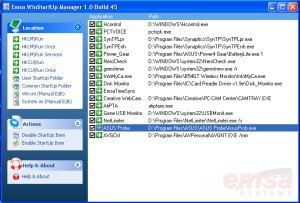
Emsa WinStartUp Manager is a tool that will help you control the list of programs that startup with your Windows. You can enable or disable any program that automatically runs at window startup, both through system registry settings or system startup folders.
How to use: Select on the right hand side at 'location' the item that you want to control. The program provides control to both registry keys that handle autorun for programs at startup, as well as the startup folders, both common and per user.
When you click on a right hand item, a list of programs available for autorun at startup is presented in the left hand pane. To allow or disallow a program to run at startup, simply check or uncheck the corresponding checkbox in the right pane.
tags right hand the right startup folders control the
Download Emsa WinStartup Manager 1.0.45
 Download Emsa WinStartup Manager 1.0.45
Authors software
 Emsa DiskCheck 1.0.77
EMSA SYSTEMS LTD
 Emsa PC FlexInfo 1.0.57
EMSA SYSTEMS LTD
 EZMem Optimizer 2.0.26
EMSA SYSTEMS LTD
Emsa EZMem Optimizer is a useful and very simple free RAM application.
 Emsa FlexInfo Pro 1.0.125
EMSA SYSTEMS LTD
Emsa PC FlexInfo Pro is a comprehensive system information and diagnstics utility.
 Emsa Bandwidth Monitor 1.0.50
EMSA SYSTEMS LTD
Emsa Bandwidth Monitor is a program that allows monitoring your internet connection speed, total traffic, average download/upload speed, etc.
Similar software
Emsa WinStartup Manager 1.0.45
EMSA SYSTEMS LTD
Emsa WinStartUp Manager is a tool that will help you control the list of programs that startup with your Windows.
 MMH Cleaner 2.1 Build 15
Mohamed El-Bably
MMH Cleaner is an utility that will help you clean your recent program files, junk files, temp and more, it will also help you control your startup programs.
 Startup Control Panel 2.8
Mike Lin
Startup Control Panel is a nifty control panel applet that allows you to easily configure which programs run when your computer starts.
 WinStartup 1.00
RJL Software
 Delayed Startup & Program Manager 2
Quantum Rift Software
Delayed Startup & Program Manager is a useful program that allows you to delay, or stop programs from running at a user's login to Windows.
 SilentNight Startup Manager 1.0
SilentNight Network and Security Tools
SilentNight Startup Manager is a tool for controlling the most used startup methods in windows.
 Windows Startup Program Manager 1.1
SB-Software
Windows Startup Program Manager will enable you to modify startup preferences in the registry.
 MSConfig Cleanup 1.50
Virtuoza
MSConfig a tool coming with Windows includes a basic startup manager which allows you to enable/disable auto-start programs.
 Emsa Time Synchronizer 1.0.58
EMSA SYSTEMS LTD
Emsa Time Synchronizer is an easy to use , very simple and useful time synchronizer and clock setter utility.
 Startup Optimizer 1.6
Cyberlion
Cyberlion Startup Optimizer will inspect programs loading at Windows startup and keeps your PC running faster, cleaner, and error-free.
Other software in this category
 ShutDownPro 1.132
Kurt Zimmermann
ShutDownPro let you shutdown, reboot, or logoff your System.
 ShutdownTray 1.3.2
VicTech Software
ShutdownTray is an application that (from your system tray) allows you quick and easy access to all of your system's power options (shutdown, restart, hibernate, screen saver, etc).
 Slawdog Smart Shutdown 2005
Slawdog E-Solutions, Inc
Slawdog Smart Shutdown is a powerful network enabled shutdown utility, that allows you to shut down, log off, reboot, lock, turn off, hibernate, disconnect from the Internet or network, enter standby mode in Windows, shut down and reboot computers in your network, both manually and automatically.
 dfg ShutDown XP 3.9.7
d.f.g.
A_ShutDown gives you an easy and thorough time controlled and automatic way to shutdown, restart or log off your system with optional power off and shutdown forcing (no questioning).
 XP SysPad 7.9
xtort.net
XP Syspad provides quick access to many Windows management features, as well as programs, system folders and more, without having to use the Control Panel or click through multiple menus to get there.

 RSS
RSS