PowerShell XP 3.01
 PowerShell for Windows XP is the newest verison of PowerShell.
|

 0.00
0.00  Freeware
 0K
0K
 Windows XP/Vista
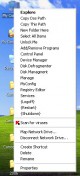
PowerShell for Windows XP is the newest verison of PowerShell. It adds all the shown items to your context menus (right click). Now you can logoff/re-start/shutdown, drop to dos, edit the registry and much more, faster!
PowerShell-XP2 adds all these items to your context menus.
Right Click The "My Computer" icon.
- Add/Remove Programs
- Calculator
- Clean Drive
- Control Panel
- Dos Prompt
- Edit Registry
- Logoff
- Quit Windows
- Reboot
- System Properties
- System Restore
Right Click The "Drive(s)" icon's.
- Clean Drive
- Defrag this Drive
- Dos Prompt
Right Click a "Folder" icon.
- Backup this Folder
- Dos Prompt
- Copy to Folder
- Move to Folder
Right Click on a File.
- Copy to Folder
- Move to Folder
- Highlight and then Right Click a word on a webpage.
- Search Dictionary
- Search for Images
- Search Newsgroups
- Search the Web
In "New" property menus.
- HTML Document
- Registration Entries
UN-INSTALL: To Un-Install go to Add/Remove Programs in Control Panel and select PowerShell-XP3. Or run uninstall found in (program filespowershell-XP3). This will remove PowerShell-XP3 from your System.
These context menu items (right click) can only be used while on a webpage.
- Search Dictionary
- Search for Images
- Search Newsgroups
- Search the Web
tags right click dos prompt for images dictionary search search for images search newsgroups search powershell xp3 the web search the search dictionary search newsgroups folder move

Download PowerShell XP 3.01

Authors software
PowerShell XP 3.01
James A. Smith
PowerShell for Windows XP is the newest verison of PowerShell.
Similar software
PowerShell XP 3.01
James A. Smith
PowerShell for Windows XP is the newest verison of PowerShell.
 PowerShellIDE 1.0
Scriptinternals
PowerShellIDE is the world's first PowerShell editor and IDE this editor supports the new Microsoft Windows PowerShell script language and includes many intellisense-like functions as well as an integrated debugger.
 ShinyPower 0.2.0.28410
Leon Bambrick
ShinyPower is a small tool designed to help you browse the built-in help that comes with Powershell.
-x86---x64--ia64.jpg "Windows PowerShell RC1 (for .NET Framework 2.0 RTM) x86 , x64, ia64 1.0") Windows PowerShell RC1 (for .NET Framework 2.0 RTM) x86 , x64, ia64 1.0
Windows PowerShell RC1 (for .NET Framework 2.0 RTM) x86 , x64, ia64 1.0
Microsoft
Windows PowerShell is a free and useful new task-based command line shell and scripting language for system administration which provides comprehensive control and automation for Windows desktops and servers.
 Lokad OpenShell 1.0
Lokad.com
Lokad OpenShell is a a small tool, a generic time-series forecasting snap-in for PowerShell.
 XP Context Tools 1.1.1
Camtech 2000
Add useful utilities to My Computer and Explorer Context Menu
XP Context Tools is a collection of useful tools added to Windows Explorer context menu used by Camtech on a daily basis.
 Context Menu Editor 1.0
Brett Bartholomew
Context Menu Editor can view and delete links to programs on your context menus (the popup menus you see when you right-click).
 Explorer Context Menu 0.3
Shane Hird
Gives you access to the standard Windows 'right click menus' rom within Winamp for songs in the playlist.
 Mmm FREE 2.0
HACE
Every program these days seem to add their own items to the windows right-click menu.
 Fast Explorer 3.1.11.430
Alex Yakovlev
Fast Explorer is a handy utility that will allow you to manage context menus items of file objects displayed in a file manager, such as Windows Explorer or Total Commander.
Other software in this category
 Folder Size Shell Extension 3.2
Space Dolphin
Folder Size Shell Extension is a handy shell extension that adds a new tab to the Properties dialog that displays a folder`s or drive`s size.
 MouseCam 1.0
CamTech
MouseCam is a free little tool that zooms everything your cursor is over up to 20 times its normal size.
 Microsoft Windows XP Plus! Service Pack 1
Microsoft Corp.
Microsoft has released an update for its addon utility: Microsoft Plus! designed for the Windows XP operating system.
 ServiceManager 1.00
L5 Software Group, LLC
ServiceManager is an application designed to allow System Administrators, Developers and Power Users an easy means to view, modify or remove services and their information.
 Command Finder 1.0
UCG Media
UCG Command Finder was created as a compliment for the Universal Command Guide to make it even easier, when you need a command, to find it.

 RSS
RSS