Inactive Shut Down Control for MS Access 3.0
 Inactive Shut Down Control is a hidden MS Access form that can be opened in your application to keep track of periods of user inactivity.
|

 0.00
0.00  Freeware
 0K
0K
 Windows Vista
Inactive Shut Down Control is a hidden MS Access form that can be opened in your application to keep track of periods of user inactivity.
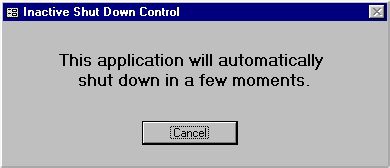
When the period of inactivity exceeds a specified limit, a warning message appears, and the application shuts down.
It is easy to use, just import a form into your application, set the period of inactivity before shut down, and open the form in hidden mode from your application startup procedure.
tags your application the period shut down
Download Inactive Shut Down Control for MS Access 3.0
 Download Inactive Shut Down Control for MS Access 3.0
Authors software
Similar software
Inactive Shut Down Control for MS Access 3.0
Peter's Software
Inactive Shut Down Control is a hidden MS Access form that can be opened in your application to keep track of periods of user inactivity.
 Hidden Utilities XP 2.0
Camtech2000
Hidden Utilities XP software will allow access to nearly 100 hidden utilities that are not normally accessible to the average user.
 SysRunner 1.0
Vasilios Freeware
SysRunner - access almost every system or hidden Windows application, and create shortcuts on your desktop with a simple right mouse-click.
 WinFastPowerOff 1.1
Zyl Soft
WinFastPowerOff is an add-in for WinFast TV tuners to can shut down the computer by the remote control.
 Winamp Control Plugin 2.6
TrueSoft
Winamp Control allows you to take control on Winamp from the taskbar.
 AMP WinOFF 4.21
Alberto Martinez Perez
This is an utility designed to shut down Windows computers automatically, with several working ways and fully configurable.
 Moonsalt Intelligent Shut Down 2.5.0
Moonsalt Software
Intelligent Shut Down is a stand-alone application that will let you schedule the shutdown of a local pc.
 Proximity Functions for MS Access 1.1
Peter's Software
"Proximity Functions" is a set of MS Access modules, forms and controls that you can use to easily add professional functionality to your MS Access application without programming.
 Slawdog Smart Shutdown 2005
Slawdog E-Solutions, Inc
Slawdog Smart Shutdown is a powerful network enabled shutdown utility, that allows you to shut down, log off, reboot, lock, turn off, hibernate, disconnect from the Internet or network, enter standby mode in Windows, shut down and reboot computers in your network, both manually and automatically.
 @Kill 1.3
aSwIt s.r.l.
@Kill will allow you to list all the opened windows (applications) on your Windows machine and to kill some of them by specifing their title.
Other software in this category
 Memoriser 1.2.0.0
Skynergy
Memoriser is a utility for helping users remember phone numbers, passwords, account numbers, birthdays and anything else that is important .
 Paste 1.0
A.Schw
The use is very simple.
 QuickReplace 1.0
killermist
This is a little program I wrote to help me write similar routines within programs more easily, especially where the only thing that changes between procedures were variable names and constant references.
 Sayz Me 0.51
Adam Bunter
Sayz Me is a simple text-to-speech software assembled in Python and freely distributed under a BSD license.
 Microsoft Office Sounds 97
Microsoft
You can install these sounds to have fun audio cues play as you work with Microsoft Word 97/98, Microsoft Excel 97/ 98, Microsoft PowerPoint 97/98 and Microsoft Outlook 97/98.

 RSS
RSS